Introduction
Moonivo Image Map turns any image into a shoppable experience for PrestaShop. Here is what it does, how it works and where to start.
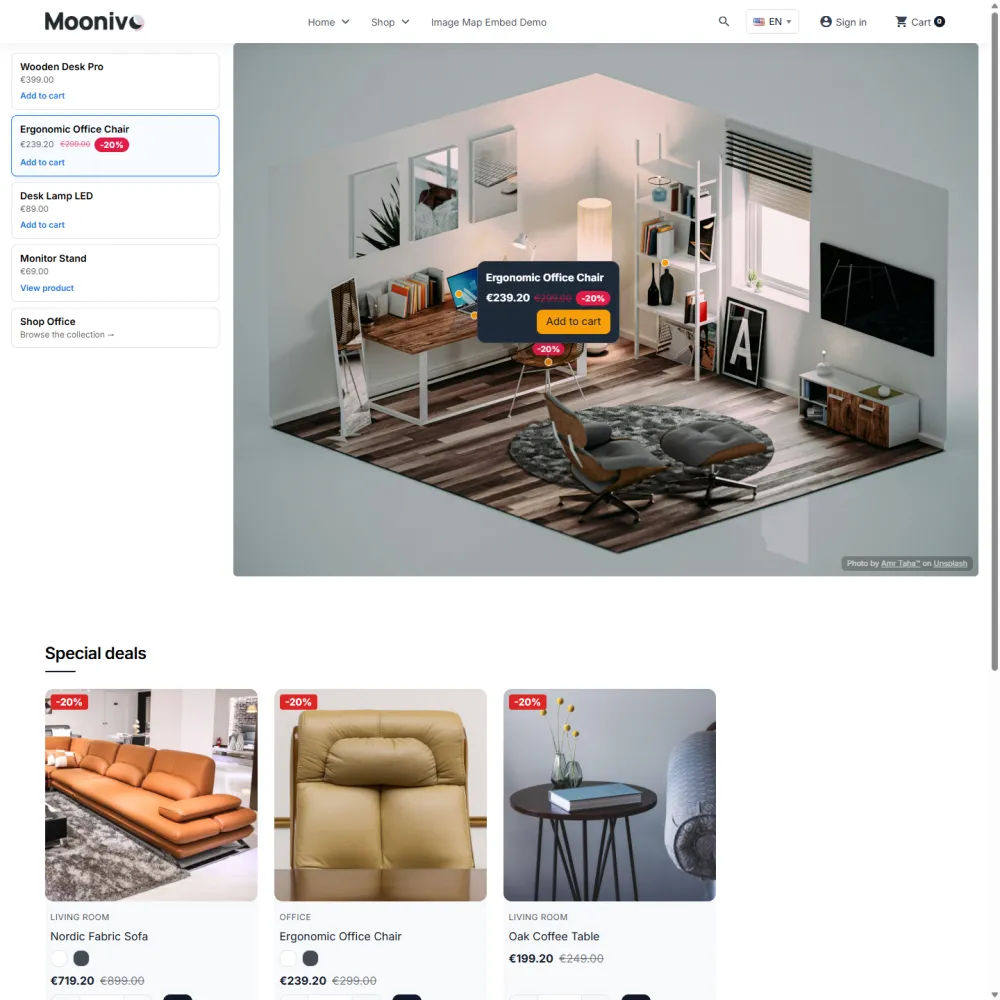
Moonivo Image Map is a PrestaShop module for interactive images. You upload a photo — a furnished room, a lookbook shot, a collection banner, a floor plan — draw clickable areas on it and connect each area to your catalogue. Visitors click a spot and get a product card with the live price, variants and an Add to cart button, right on the image.
What you can build
- Shop the look. A room or outfit photo where every item opens its product card and can go straight to the cart — one by one or all together.
- Lookbooks. A synced product list next to the picture, with filters such as Chairs / Lamps / Tables.
- Several rooms in one map. Switch between Kitchen, Bedroom and Living room photos without leaving the page.
- Guides and diagrams. Size charts, floor plans or product anatomy, with cards that explain each part.
- Seasonal campaigns. Maps that switch on and off by date and can be A/B tested against each other.
How it works
- Create a project and upload an image. A project is one image map.
- Draw areas. Rectangles, circles, polygons (with rounded corners and curves) or pulsing hotspot dots.
- Link each area. To a product, category, CMS page, any URL — and give it a card with text, price and buttons.
- Place the map in your shop. On the home page, in a CMS page, a category or product description, or in a theme file.
The quick start walks through these steps in about five minutes.
Key terms
| Term | Meaning |
|---|---|
| Project | One image map: its image, shapes, styles and settings. Each project has a slug, the short name used to place it in your shop. |
| Shape | A clickable area on the image: rectangle, circle, polygon or hotspot. |
| Hotspot | A small animated dot, the most common way to mark a product in a photo. |
| Action | What happens when a visitor clicks a shape: open a product, category, CMS page or link. |
| Card | The pop-up that opens on hover or click, with a title, text, price and buttons. Also called the tooltip. |
| Scene | One of several images inside the same project, switched by the visitor. A project always has at least one scene. |
| Product list | A list of the map's products shown beside the image and kept in sync with it (the lookbook). |
Highlights
- Live prices, sale badges, stock and variants in the cards, always read from your catalogue.
- Multi-product cards with a single Add all to cart button.
- Click analytics, conversion rate and a real click heatmap.
- GA4 and Meta Pixel events through the tags your shop already uses.
- Multilingual cards that follow the visitor's language, and full multistore support.
- Fast loading with no layout shift, mobile ready, and usable with a keyboard and a screen reader.
Try it
- Live demo — the storefront with several example maps.
- Demo back office — try the editor yourself. The demo resets regularly.
- Get it on PrestaShop Addons
Still stuck?
Customers get support through the PrestaShop Addons contact form, so every request is tracked.
Missing a feature or have an idea? Tell us what you need
Last updated October 24, 2026