Guides · · 8 min read
We upgraded a PrestaShop 1.7.6 store to 9.2: what the upgrade tool said and what actually broke
A 1.7.6 test store with Mollie, PayPal, a child theme, an override and typical agency code, upgraded step by step to PrestaShop 9.2 with the official tool. What it reported, what it missed, and what we fixed.

The official upgrade tool took about three minutes to move our store from PrestaShop 1.7.6 to 9.2. Making the store work properly again took much longer, and most of what broke came with no error message at all.
We wanted to see this for ourselves rather than repeat what release notes say. So we built a PrestaShop 1.7.6.7 store that looks like the ones we are asked to upgrade, upgraded it with the official tool, and wrote down everything: what the tool reported, what it missed, and what we had to fix by hand.
The store
It is a test store we built ourselves, not a client's. We set it up to look like a typical 1.7 store that has been running for a few years:
- Payment and marketing modules from 2020: Mollie 4.0.9, PayPal 5.2.1 (with its bundled Guzzle 6), product comments, wishlist and Google Analytics.
- A child theme of Classic with its own product page block, CSS and JavaScript.
- An override of the product page controller that adds a delivery estimate ("Order today, delivered by…").
- A small custom module, written the way a lot of agency code from that time is written:
Tools::displayPrice()for prices,Tools::jsonEncode(), PHP'seach(), the oldAttributeclass, a stand-aloneajax.phpin the module folder,addJquery()and jQuery's.size(). - The demo catalogue, guest checkout and bank wire payment.
After every step we ran the same automated test: open a product page and check every custom block, add to cart, check out as a guest, place an order, and open the main back-office pages. We also kept a full backup of each step, so every finding below can be reproduced.
The path
You cannot jump from 1.7.6 to 9 in one go, and the server has to move with you:
- PHP 7.1 → 7.2. The current upgrade module (7.6.6) does not run on PHP 7.1 at all, so this comes first. PHP 7.2 is still supported by PrestaShop 1.7.6.
- PrestaShop 1.7.6.7 → 8.2.8 with the official upgrade module.
- PHP 8.1. PrestaShop 8.2 runs on it, and PrestaShop 9 needs it.
- PrestaShop 8.2.8 → 9.2.0. Note: the default recommended channel did not offer version 9 at all. Only the online channel did.
Before step 1 we ran our own free readiness check. It listed five problems in the custom module, the override's missing return type, 18 findings in old Mollie and 4 in old PayPal, the old PHP version and 309 database tables not yet in utf8mb4.
Step 1: 1.7.6 → 8.2, "updated, but some warnings"
The upgrade itself took 105 seconds. Beforehand, the tool warned us about three small native modules it would uninstall. About Mollie and PayPal it said nothing.
What actually happened:
- Mollie and PayPal were replaced with their latest files, but their own upgrade scripts failed, so PrestaShop quietly disabled both. The database still held the old versions. The store opened normally, with no card payments and no visible error.
- Four more modules were disabled the same way: the share buttons, PrestaShop Checkout, our custom module and our own readiness check.
- The trust icons under the add-to-cart button returned 404 on every page (30 requests per page), because the database still pointed to the old icon files.
- Bank wire orders still worked, so a quick "can I place an order" test would have passed.
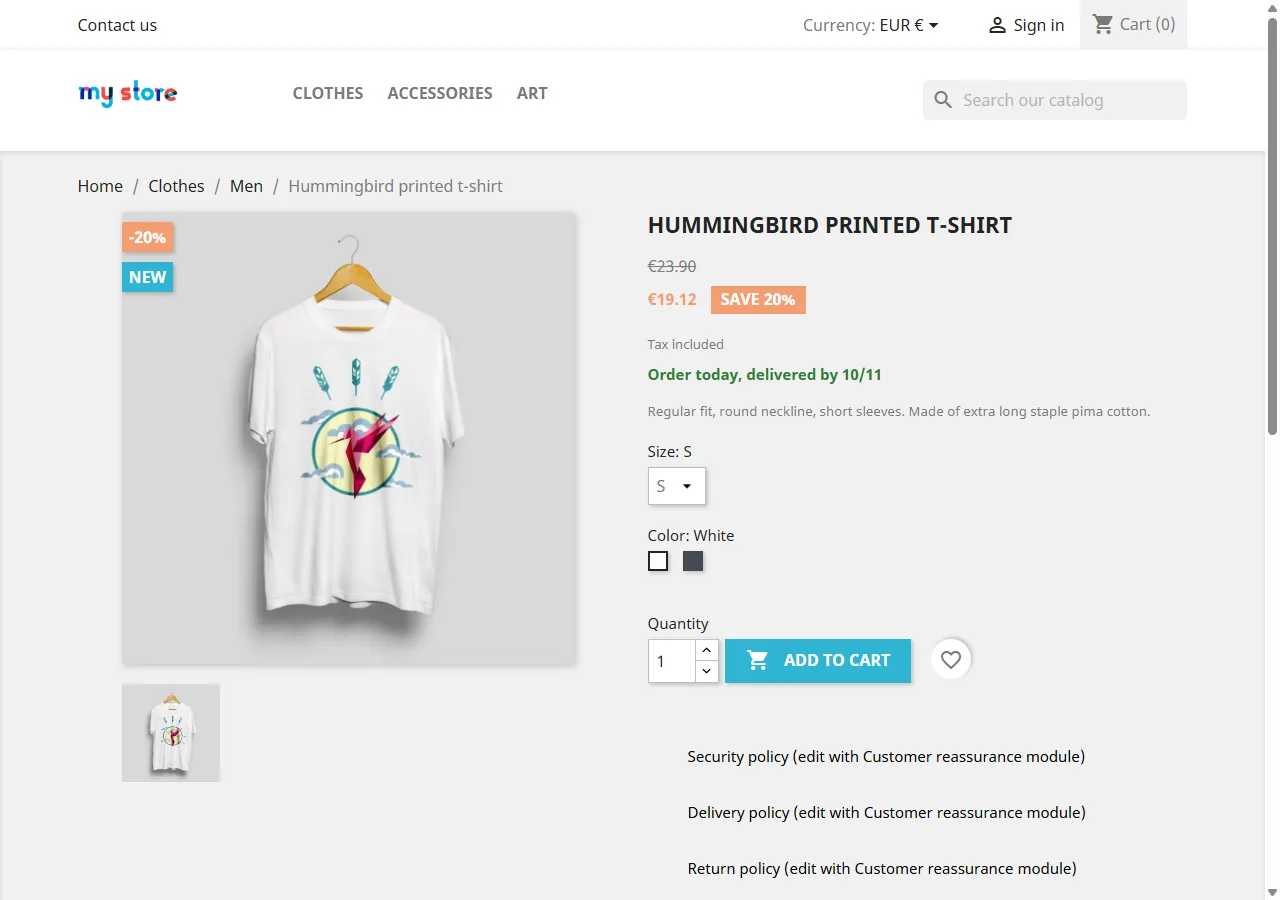
Then there were the silent bugs, which are the reason a quick look is not enough:
- The combination name vanished from the stock line. In PrestaShop 8, the class
Attributewas renamed toProductAttribute. On PHP 8 the old name now points to PHP's ownAttributeclass, sonew Attribute($id)does not crash. It just returns an empty name. Nothing in any log. - The module's
ajax.phpreturned error 500:Tools::jsonEncode()no longer exists in PrestaShop 8.
How we fixed it:
- Mollie, PayPal and the share buttons could not be upgraded in place. They had to be uninstalled and installed again. That means their settings and API keys have to be entered again, and Mollie's own tables with old order data are dropped. Plan for that on a real store.
- The custom module got one rewrite that works on both 8 and 9:
ProductAttributeinstead ofAttribute,json_encode(), aforeachinstead ofeach(), prices formatted through the current locale, a module front controller instead ofajax.php, and the script registered withregisterJavascript(). A small upgrade script converts its saved settings to the new format. - The override got
: voidoninitContent(). It works on 8 already and is required on 9. - The trust icons got their new paths in the database.
Step 2: PHP 8.1
No errors. The only thing we noticed: a returning visitor's browser kept the old theme.css from cache, and six share-button icons were missing until the cache expired. In a clean browser everything looked right. After an upgrade, some customers see an old cached version of the store for a while.
Step 3: 8.2 → 9.2
The upgrade took 73 seconds. Two things are worth knowing.
The tool would have uninstalled PayPal. It marked PayPal 6.7.1 as incompatible with PrestaShop 9 and offered to remove it, settings included. PayPal's own changelog lists PrestaShop 9 support from version 6.5.0. We upgraded with the option that keeps incompatible modules, PayPal stayed active, and its settings page works on 9.2. Had we accepted the default, the store would have lost its PayPal setup without a good reason.
The back office answered with error 500 right after the upgrade, because of an old cache. Clearing all of var/cache fixed it.
To see what step 1 had saved us from, we briefly put the old code back:
- The old override made every product page fail with error 500: Declaration of ProductController::initContent() must be compatible with ProductControllerCore::initContent(): void. One missing return type takes down the whole catalogue.
- The old
ajax.phpwas blocked with 403. PrestaShop 9 no longer lets the browser open PHP files in module folders directly. addJquery(),Tools::displayPrice(),Tools::jsonEncode(),ajaxDie()and Swift Mailer no longer exist in 9.2. The old module calledaddJquery()in its header hook, which would have stopped every page of the storefront.
One thing that did not break: jQuery's old .size() and .bind() still worked in PrestaShop 9.2 with the Classic theme. We fixed them anyway, but they are not the emergency some guides make them out to be.
Step 4: what the upgrade tool never mentioned
With the store on 9.2, we ran our readiness check again. It found problems that the upgrade tool had not reported:
- The official GDPR module was still at version 1.4.4. On 9.2, the request that records a customer's consent when they tick the GDPR box failed with a fatal error (
ajaxDie()). The checkout still worked, the consent was just never saved. That is easy to miss and a real compliance problem. Version 2.0.1 fixes it. A trap here: running the module upgrade from the command line downloaded 1.4.4 again from the PrestaShop catalogue and overwrote our 2.0.1, so we had to install it by hand. - Mollie 6.4.7 still contains code that cannot run on 9.2: two old front controllers call a removed method, one settings form uses the old
Attributeclass, and the service that shows payment surcharges callsTools::displayPrice(). The current payment flow does not use the old controllers, so card payments should not be affected. But if you charge a surcharge for a payment method, checkout is likely to fail. We could not test that without a Mollie account, so treat it as a finding in the code, not a confirmed failure. - PayPal 6.7.1 still calls
Tools::jsonEncode()in its logout action in the back office.
The final test on 9.2 passed: product page with every custom block, cart, guest checkout, order confirmation, and the back office (dashboard, orders, product list and edit page, customers, modules, Mollie and PayPal settings). No errors in the browser console.
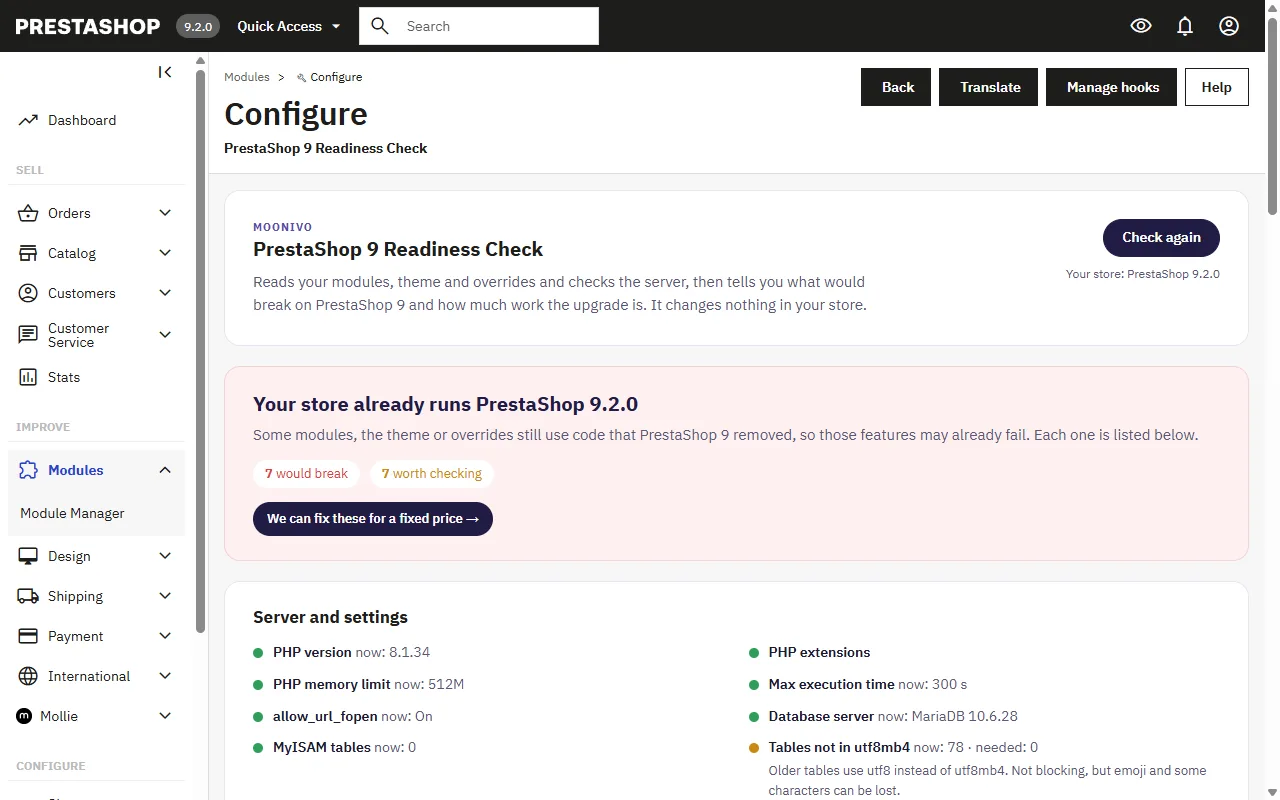
Our own tool had gaps too
We ran our free check on every step, so it would have been dishonest not to look at its results the same way.
- It missed
$this->context->controller->addJquery(), the exact call that would have broken every page. It only looked for$this->addJquery(). - On the working 9.2 store it showed 16 errors, and some were false: Mollie code that checks the PrestaShop version before choosing a method, a
class_exists('AttributeCore')check, and ps_facetedsearch cron files that the module itself allows in its own.htaccess.
We fixed both in version 1.1.3, released the same day. On the same store it now shows 8 errors, and each of them is real code that fails on 9.2. Code that checks the version or the class first is now listed as something to verify, not as an error.
What we would tell a store owner
- The upgrade itself is fast. Checking everything afterwards is the real job. Three minutes of upgrading left us with disabled payment modules, missing icons, an empty combination name and unsaved GDPR consents, and none of them showed an error.
- "The upgrade finished" means nothing for payment modules. Check in Modules that every payment module is enabled and at the version you expect, then place a real test payment with each one.
- Do not accept "uninstall incompatible modules" blindly. Look up each module in its own changelog first.
- Overrides of core controllers are the biggest single risk on PrestaShop 9. One line can take down every product page.
- Clear the whole cache after each step, and expect some customers to see old CSS for a while.
- Do it on a copy first, with a test that covers your own custom features, not just the order.
What we did not test
To be clear about the limits: we did not make real card payments with Mollie or PayPal (that needs sandbox accounts), so only bank wire orders were placed. We did not test multistore, a large catalogue or a production server's speed. And the custom code was written by us to look like typical old code. A real store usually has more of it and in stranger places.
To see which version a store is on before anything else, check it by its address.
If you want to know what your own store is in for, the free readiness check reads your modules, theme and overrides in a couple of seconds and changes nothing. If you would rather not do this yourself, we upgrade PrestaShop stores to version 9 for a fixed price from €900, on a copy first, with the same step-by-step testing as here. For the individual error messages, see PrestaShop 9 errors, one by one.