Guides · · 5 min read
Is your store ready for PrestaShop 9? How to check in an hour
Before you plan an upgrade to PrestaShop 9, find out what would break. What to check in modules, overrides, the theme and the server, how to do it by hand, and a free module that does it for you.

Most PrestaShop 9 upgrades that go wrong were decided before they started. The plan said "one weekend", and then a payment module, two overrides and an old slider turned out to use code that PrestaShop 9 no longer has. The upgrade itself is the easy part. Knowing what will break is the part that decides the cost.
This guide shows how to find that out before you commit: what to look at, where to look, and how to read what you find. If you want the steps of the upgrade itself, read Upgrading to PrestaShop 9: what breaks and how to prepare.
What decides whether a store is ready
Four things, in the order they usually cause trouble:
- Modules. Every third-party module either has a PrestaShop 9 version, can be fixed, or has to be replaced. Most problems are here.
- Overrides. Files in the
override/folder replace core code. PrestaShop 9 changed many core classes and added return types to their methods, so an old override can stop the whole store with a fatal error as soon as it loads. - The theme. Templates that rely on removed variables, old JavaScript libraries or the old product page.
- The server. PHP 8.1 or newer, the database version, a few settings, and features PrestaShop 9 removed.
Modules: look at the code, not the version number
The version range a module declares tells you little. Many modules say they support "1.7 to 8" and work on 9, and some say "up to 9" and still call methods that no longer exist.
What actually breaks a module on PrestaShop 9:
- Removed classes and methods. For example
Tools::displayPrice(),Tools::jsonEncode()andController::ajaxDie()are gone. A module that calls them stops with a fatal error on the page that uses it. - Hooks that no longer fire. The old product page and several back office pages were rebuilt, and their hooks went with them. The module installs fine, but its fields or tabs silently disappear.
- Services that were renamed or removed when the back office moved to Symfony 6.4.
- PHP 8 syntax. Code written for PHP 5 or 7, like curly-brace string offsets or removed functions such as
create_function(), does not load at all. - Direct access to PHP files. On Apache, PrestaShop 9 blocks browsers from opening PHP files inside modules, so old AJAX endpoints stop answering.
To check by hand, list every module that is not made by PrestaShop, then search each module folder for the removed names. It is slow, but it tells you what you are dealing with. Modules from PrestaShop itself are updated together with the store, so you can skip those.
Overrides: every file needs a reason
Open the override/ folder. Each file there replaces part of the core, and each one has to be checked against PrestaShop 9, even when it looks harmless.
The most dangerous case is an override that redefines a method which PrestaShop 9 gave a return type. PHP refuses to load a class whose method does not match its parent, so the error is not limited to one page: the store stops. Remove overrides that nobody needs any more, and rewrite the rest before the upgrade, not after.
The theme
A theme based on Classic usually survives. What breaks is custom work inside it: templates that use variables PrestaShop 9 no longer passes, modules that ship their own templates into the theme, and old jQuery plugins. A child theme is the easiest case, because the changes are in one place.
The theme cannot be fully judged by reading files. Plan to click through the home page, categories with filters, a product with combinations, the cart and every payment method on a copy of the store.
The server and settings
- PHP 8.1 or newer. Most hosts let you switch the version in the hosting panel. Test on a copy first, because old modules often fail there.
- MySQL 5.7+ or MariaDB 10.2+, and tables in InnoDB rather than MyISAM.
- Advanced Stock Management and delivery to several addresses were removed in PrestaShop 9. If you use them, decide what replaces them before upgrading.
- SMTP with SSL is no longer offered. Switch mail to TLS (usually port 587).
Let a module do the reading
Reading every module by hand takes days on a store with fifty modules. So we built the check into a free module: PrestaShop 9 Readiness Check.
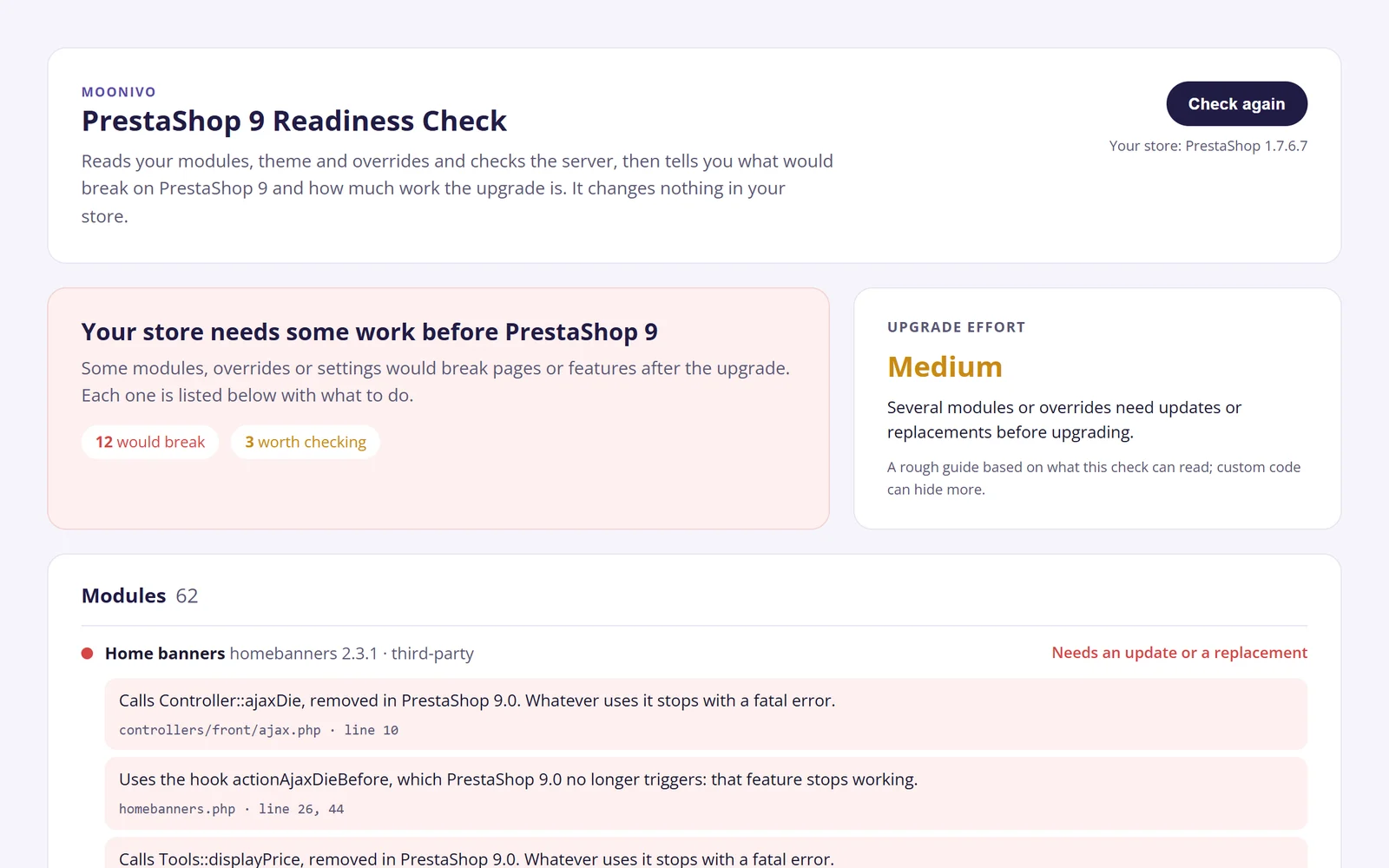
You install it like any module, open Advanced Parameters > PrestaShop 9 check and click Check my store. In about a minute it:
- reads the code of every module, the theme and the overrides, and compares it with more than 1,000 classes, methods, hooks and services that PrestaShop 8 and 9 removed or changed, plus PHP 8 syntax and functions;
- checks the server: PHP version and extensions, memory, database, table engines, and the features PrestaShop 9 removed;
- marks each module as needs an update or a replacement, worth checking or no problems found, with the file and line of every finding;
- gives a rough upgrade effort: simple, medium or complex;
- saves the report as a PDF you can send to your developer or to whoever decides on the upgrade.
It is read-only: it does not change files or settings, and nothing is sent anywhere. It runs on PrestaShop 1.7, 8 and 9, in English, Lithuanian and French. On a store that already runs PrestaShop 9 it shows what still uses removed code, which helps when something broke after an upgrade.
Get the free module: leave your email and we send the download link.
How to read the report
- Needs an update or a replacement means the code uses something PrestaShop 9 does not have. Look for an update from the module's author first. If there is none, the module needs a fix or a replacement.
- Worth checking means the code touches removed code but probably handles it, for example by checking the PrestaShop version first, or the finding is in a library bundled with the module. Test those modules on the copy.
- Overrides are always listed, because each one needs a look even when nothing is flagged.
- The upgrade effort is a guide, not a quote. Custom code can hide more than any automated check finds.
Remember what no tool can see: whether checkout still sends orders to your warehouse, whether the ERP sync still runs, how the theme looks. The report tells you where to look; testing on a copy tells you the rest. When errors do show up after the upgrade, this list of common PrestaShop 9 upgrade errors explains what each one means, and the most frequent messages have a page each with the exact fix.
Need a hand?
If the report shows more work than you want to take on, we upgrade PrestaShop stores to version 9 for a fixed price from €900: we update or replace the flagged modules, fix the overrides and the theme, and switch over from a tested copy, so the live store keeps selling. Send us the report and you get the exact price before any work starts.